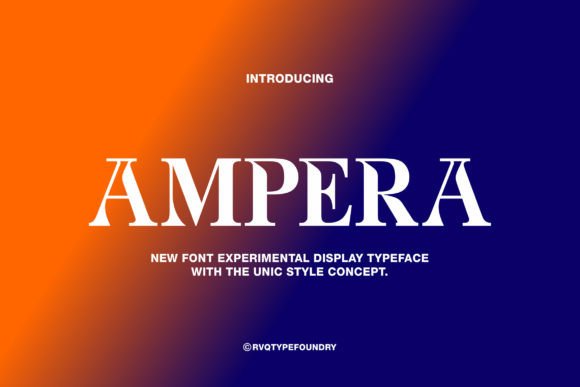
Ampera: Mastering the Retro-Elegant Typeface for Professional Results
Typography is often the silent architect of a brand's identity, yet many creators overlook how a single font choice can make or break a design's emotional resonance. Ampera stands out in this crowded landscape as a typeface that effortlessly blends an elegant, retro vibe with modern versatility. It is not merely a decorative script; it is a robust tool designed to elevate headlines, logos, and editorial layouts. However, simply downloading a font file does not guarantee a stunning result. To truly harness the potential of Ampera, one must understand its unique architecture, particularly how mixing uppercase and lowercase letters creates its signature rhythm.
The Distinctive Character of Ampera
At its core, Ampera is a versatile font that captures the nostalgia of mid-century design while maintaining the clarity required for contemporary digital media. Its appeal lies in the delicate balance between ornamental flair and legibility. Unlike generic serif fonts that can feel stiff or outdated, Ampera breathes life into text through its fluid curves and dynamic strokes. This makes it a favorite among entrepreneurs, marketers, and hobbyists who need their visual communication to feel both premium and approachable.
The true magic of this typeface emerges when you move beyond standard usage. The font includes a complete set of capital and lowercase letters, but the real power is unlocked by combining them strategically. When paired with alternative glyphs, Ampera transforms from a simple typeface into a customizable design system. Whether you are crafting a logo for a boutique coffee shop or designing a header for a lifestyle blog, the ability to mix cases and swap characters allows for endless creative expression without sacrificing readability.
Common Pitfalls in Applying Ampera
Despite its flexibility, there are several common mistakes that can undermine the effectiveness of Ampera in your projects. One of the most frequent errors is treating the font as a monolithic block of text. Many beginners apply Ampera to large bodies of copy, such as long paragraphs in brochures or website articles. Because of its distinct retro styling and decorative elements, using it for extended reading can cause eye strain and reduce comprehension. This misuse dilutes the elegance of the font and makes the content appear cluttered rather than sophisticated.
Another overlooked detail is the failure to utilize the alternative glyphs included in the font family. Ampera comes equipped with special characters, currency symbols, and numerals designed to complement the main letterforms. Ignoring these features often leads to a disjointed look where numbers or punctuation clash with the surrounding text. For instance, using standard sans-serif numerals alongside the flowing curves of Ampera capitals can create a jarring visual interruption. This lack of cohesion signals a lack of attention to detail, which can negatively impact the perceived quality of a brand.
Misunderstanding Case Sensitivity and Hierarchy
A critical misunderstanding involves the handling of case sensitivity. While all-caps text might seem bold and authoritative, applying it indiscriminately to Ampera can flatten its aesthetic appeal. The font was designed with the intention that users would mix uppercase and lowercase letters to create a natural flow. Overusing all-caps removes the vertical variation that gives the typeface its rhythm, making headlines look shouty and aggressive rather than elegant. Conversely, relying solely on lowercase can sometimes make the design feel too casual for professional contexts.
This mistake affects usability and presentation significantly. A headline that lacks proper hierarchy fails to guide the reader's eye effectively. In marketing materials, this can lead to lower engagement rates because the key message gets lost in a sea of uniform shapes. By failing to leverage the contrast between tall ascenders and deep descenders, designers miss the opportunity to create a visual entry point for the audience.
Strategies for Optimal Usage
To avoid these pitfalls and achieve a stunning combination with Ampera, a more deliberate approach is necessary. Start by restricting the use of the font to areas where it can shine: headlines, subheadings, logos, and short pull quotes. For body text, pair Ampera with a clean, neutral sans-serif or a simple slab serif. This pairing ensures that the retro elegance of Ampera acts as an accent, drawing attention to key points without overwhelming the reader.
Take full advantage of the multilingual support and additional glyphs provided in the font package. Before finalizing a design, audit your text for any special characters. If you are displaying prices, dates, or technical specifications, ensure you are selecting the specific numerals and symbols included in the Ampera set. These elements are crafted to match the weight and style of the letters, creating a seamless visual experience. This attention to detail demonstrates professionalism and enhances the overall quality of the communication.
Practical Examples of Better Approaches
Consider a scenario where a small business owner is designing a flyer for a new product launch. Instead of writing the entire flyer in Ampera, they should use the font exclusively for the main title and the call-to-action button. By mixing uppercase and lowercase in the title—perhaps capitalizing the first letter of each word while keeping the rest lowercase—they create a sophisticated, magazine-style look. Then, by swapping a standard "g" for an alternative glyph version, they add a unique touch that makes the brand memorable.
In another example, a blogger might want to highlight a quote within an article. Rather than using a generic blockquote style, they could typeset the quote in Ampera, utilizing the alternative glyphs for quotation marks to ensure stylistic consistency. The surrounding article text remains in a highly readable font, allowing the quote to stand out as a piece of art while the information remains accessible. This approach balances aesthetics with function, ensuring that the design serves the content rather than distracting from it.
Evaluating Your Decision Before You Buy
Before purchasing or downloading Ampera, it is essential to evaluate whether it aligns with your specific project needs. Check the licensing terms carefully to ensure you have the rights to use the font for your intended scope, whether it be web, print, or app development. Additionally, test the font across different mediums. A typeface that looks stunning on a high-resolution monitor may behave differently when printed on textured paper or viewed on a mobile screen.
Verify the character set coverage if your project requires multilingual support. While Ampera offers extensive language options, confirming that it supports the specific scripts or diacritics you need is crucial to avoid last-minute redesigns. Finally, consider the long-term viability of the design. Trends come and go, but a well-executed application of a versatile font like Ampera can remain timeless. By focusing on balanced composition and thoughtful character selection, you ensure that your work stands the test of time.
Ultimately, the success of Ampera in your portfolio depends on how well you understand its strengths and limitations. It is a powerful tool for those willing to explore its nuances, offering a bridge between vintage charm and modern utility. By avoiding common traps and embracing its unique features, you can create designs that are not only visually striking but also effective in communicating your message to adults, professionals, and consumers alike.